
How to use Django Database
Database designing Part 1
Hello programmers, today as we are going to continue our ongoing project i.e. Building Social bookmarking application using Django and Python. Today we are going to took one step ahead. Today we are going to Design a database model for our project. As we discussed before Database comes in model and the modern web development depends on The MVC structure today we are going to learn the M i.e Model from this structure so lets start.
Note that this post is going to be a bit lengthy so we have divided this into two equal parts.
Introduction:
Almost every web application requires database model to store and retrieve user data from application. And that’s why database became fundamental requirement of web application. By offering a Well-designed UI to the customer web application manage their data using a well-designed database engine.
We are going to use the database design that we installed and configured in previous post.(Take a look at This) in this section we are going to use that database to store and manage user data i.e. user accounts and their bookmarks.
Django uses python class to access the database tables . For every action we or the Developer took regarding database handling i.e To store, manipulate and retrieve data from database. in order to do this only SQL knowledge is not sufficient.
For our Bookmark application we are going to store our data into database by three ways.
- User account table which contains (User ID,username,password, email-id)
- Links(Link ID, URL)
- Bookmarks which contains (User ID, Link ID,Bookmark ID, Bookmark Title)
Here we can get that each user table will contain unique User account along with there user id, username and password associate with that account. Same with the Links table.
To convert design this whole system into python code we need to edit model.py in our bookmark project folder.
Note that model.py is the file where our application’s database model are being stored and this file only contains an import line when it is created by command manage.py startapp
The Link Database Model
Here we are going to start coding. Here we are going to start by creating the database model for the Link table because this is the simple one database in our project. Now open bookmarks/model.py in your code editor and write following code.
Code:
from django.db import models
class Link(models.Model):
	url = models.URLField(unique=True)
Here the model package we are import from django.db contains various classes that are required to define the models. After this we have defined a class named Link which inherits models.Model which is base class for all models. The class contains one text field named url which is of type models.URLField which must be unique.
Now to use this created model we firstly have to activate this model in our Django Project. Get this done by opening settings.py file in editor and look for INSTALLED_APPS Variable and in the last of this variable declaration add our application name ‘bookmarks’
It will look like this..
INSTALLED_APPS = [
    'django.contrib.admin',
    'django.contrib.auth',
    'django.contrib.contenttypes',
    'django.contrib.sessions',
    'django.contrib.messages',
    'django.contrib.staticfiles',
    'bookmarks',
]
Now run the following commands in cmd to create table for the Link datamodel in our database
python3 manage.py makemigrate
python3 manage.py migrate
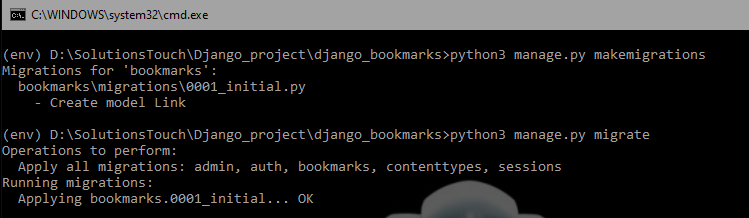
Now you will see that migration is done successfully. So here we stop for now because this post is becoming a little bit lengthy. you can continue working on this with our next post. Till now if you face any problem regarding this post. Feel free to comment below. we will try to solve your problem as soon as possible. If you like this post and any other post on this website feel free to share this with your friends.
Thank you..
Happy Coding..