

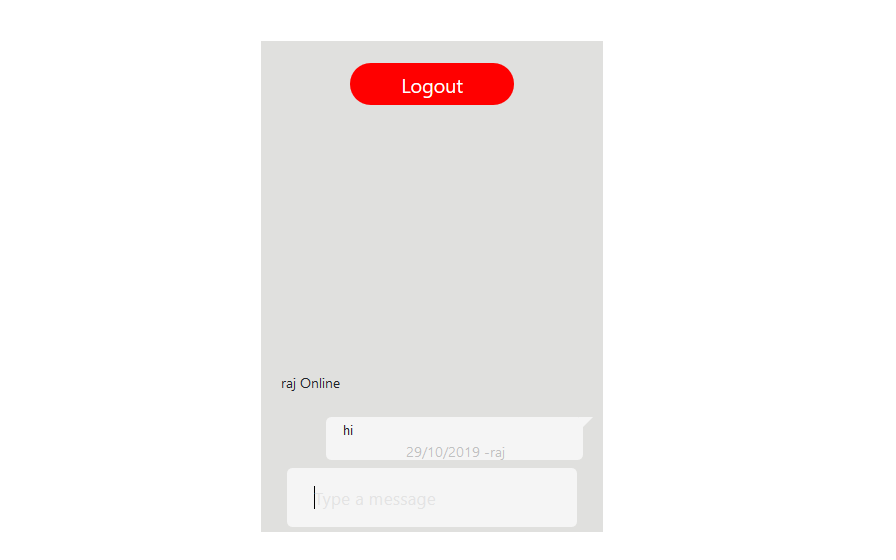
Hello friend, I will implement simple chatroon in codeigniter with ajax. In this tutorial I creating login system for user identification. We will able to chat with our logged member. Every person want to be their own simple chatroom application. This simple chatroom application used for any text communication. This tutorial help any one of you to create your own application for business communication like service provider to client. It’s very useful and important application which help to improving our own business. This application implementation very easy, in which not use any data base. This application is appended html script into one file. Multiple person can communicate with each other at same time is called real time chat application. When real time cahting is perform that time creater is responsible for quick message receiving to end user. Ajax with Jquery script is used to send and received request for data from client side to server and server to client side using codeigniter without refresh web page.
Controllers (Application/controllers/Chatroom.php)
defined('BASEPATH') OR exit('No direct script access allowed');

class Chatroom extends CI_Controller {


	public function index()
	{
		if ($this->session->userdata('user_name')) {
			# code...
			$this->load->view('chatroom');
		}
		else{
			$this->load->view('login');
		}

	}
	public function login()
	{
		# code...
		 $names=$this->input->post('user_name');
		$response="";
		if ($names) {
			$this->session->set_userdata('user_name',$names);
			$response="login";

		$names=$this->session->userdata('user_name');
		$today = date("d/m/Y");

		$data =  '<li style="width:100%;">

							<p><small>'.$names.' Online</small></p>

						</li>';
		 write_file('./chat/msg.php', $data,'a');

		}
		echo json_encode($response);
	}


	public function logout()
	{
		$this->session->unset_userdata('user_name');

		return redirect(base_url());
	}

	public function insert()
	{
		# code...

		$names=$this->session->userdata('user_name');
		 $text_msg=$this->input->post('text');
		 $today = date("d/m/Y");
		$data =  '<li style="width:100%;">
						<div class="msj-rta macro">
						<div class="text text-r">
							<p>'.$text_msg.'</p>
							<p><small>'. $today.'  -'.$names.'</small></p>
							</div>
						<div class="avatar" style="padding:0px 0px 0px 10px !important"></div>
						</li>';
		 write_file('./chat/msg.php', $data,'a');
	}

}
View (Application/views/layout/chatroom.php)
<!DOCTYPE html>
<html lang="en">
<head>
    <meta charset="utf-8">
    <title>Simple Chat </title>
        <meta name="viewport" content="width=device-width, initial-scale=1">
    <link href="http://maxcdn.bootstrapcdn.com/bootstrap/4.0.0/css/bootstrap.min.css" rel="stylesheet">
    <style type="text/css">
        .mytext{
    border:0;padding:10px;background:whitesmoke;
     overflow: auto;
}
.text{
    width:75%;display:flex;flex-direction:column;

}
.text > p:first-of-type{
    width:100%;margin-top:0;margin-bottom:auto;line-height: 13px;font-size: 12px;
}
.text > p:last-of-type{
    width:100%;text-align:right;color:silver;margin-bottom:-7px;margin-top:auto;
}
.text-l{
    float:left;padding-right:10px;
}
.text-r{
    float:right;padding-left:10px;


}
.avatar{
    display:flex;
    justify-content:center;
    align-items:center;
    width:25%;
    float:left;
    padding-right:10px;
}
.macro{
    margin-top:5px;width:85%;border-radius:5px;padding:5px;display:flex;
}
.msj-rta{
    float:right;background:whitesmoke;

}
.msj{
    float:left;background:white;

}
.frame{
    background:#e0e0de;
    height:450px;
    overflow:hidden;
    padding:0;
    left: 40%;
    top: 80px;

}
.frame > div:last-of-type{
    position:absolute;bottom:5px;width:100%;display:flex;
}
ul {
    width:100%;
    list-style-type: none;
    padding:18px;
    position:absolute;
    bottom:32px;
    display:flex;
    flex-direction: column;

}
.msj:before{
    width: 0;
    height: 0;
    content:"";
    top:-5px;
    left:-14px;
    position:relative;
    border-style: solid;
    border-width: 0 13px 13px 0;
    border-color: transparent #ffffff transparent transparent;
}
.msj-rta:after{
    width: 0;
    height: 0;
    content:"";
    top:-5px;
    left:14px;
    position:relative;
    border-style: solid;
    border-width: 13px 13px 0 0;
    border-color: whitesmoke transparent transparent transparent;
}
input:focus{
    outline: none;
}
::-webkit-input-placeholder { /* Chrome/Opera/Safari */
    color: #d4d4d4;
}
::-moz-placeholder { /* Firefox 19+ */
    color: #d4d4d4;
}
:-ms-input-placeholder { /* IE 10+ */
    color: #d4d4d4;
}
:-moz-placeholder { /* Firefox 18- */
    color: #d4d4d4;
}


   .logout-popup-btn {
        background: red;
        border: none;
        border-radius: 25px;
        color: #fff;
        display: block;
        font-size: 18px;
        height: 38px;
        line-height: 28px;
        margin: 20px auto 5px;
        width: 150px;
        -webkit-transition: all 700ms ease;
        -moz-transition: all 700ms ease;
        -ms-transition: all 700ms ease;
        -o-transition: all 700ms ease;
    }
    </style>
    <script src="http://code.jquery.com/jquery-1.11.1.min.js"></script>
    <script src="http://maxcdn.bootstrapcdn.com/bootstrap/4.0.0/js/bootstrap.min.js"></script>
</head>
<body>
<!DOCTYPE html>
<html>
    <body>

        <div class="col-sm-3 col-sm-offset-4 frame">

            <a class="logout-popup-btn btn btn-default"  href="<?php echo base_url() ?>Chatroom/logout">Logout</a>

            <ul id="msgbox"></ul>
            <div>
                <div class="msj-rta macro" style="margin:auto">
                    <div class="text text-r" style="background:whitesmoke !important">
                        <input class="mytext" placeholder="Type a message"/>
                    </div>
                </div>
            </div>
        </div>
    </body>
</html>
<script type="text/javascript">
$(document).ready(function(){
    $(".mytext").on("keyup", function(e){
    if (e.which == 13){
        var text = $(this).val();
        if (text !== ""){
            $.post("<?php echo base_url(); ?>Chatroom/insert", {text: text});
            $(this).val('');
            loadLog();
        }
    }
    });
  loadLog();
});

function loadLog(){
    var oldscrollHeight = $("#msgbox").attr("scrollHeight") - 20;
    $.ajax({
        url: "<?php echo base_url(); ?>chat/msg.php",
        cache: false,
        success: function(html){
            $("#msgbox").html(html);
            var newscrollHeight = $("#msgbox").attr("scrollHeight") - 20;
            if(newscrollHeight > oldscrollHeight){
                $("#msgbox").animate({ scrollTop: newscrollHeight }, 'normal');
            }
        },
    });
}
setInterval (loadLog, 2500);
</script>
</body>
</html>