

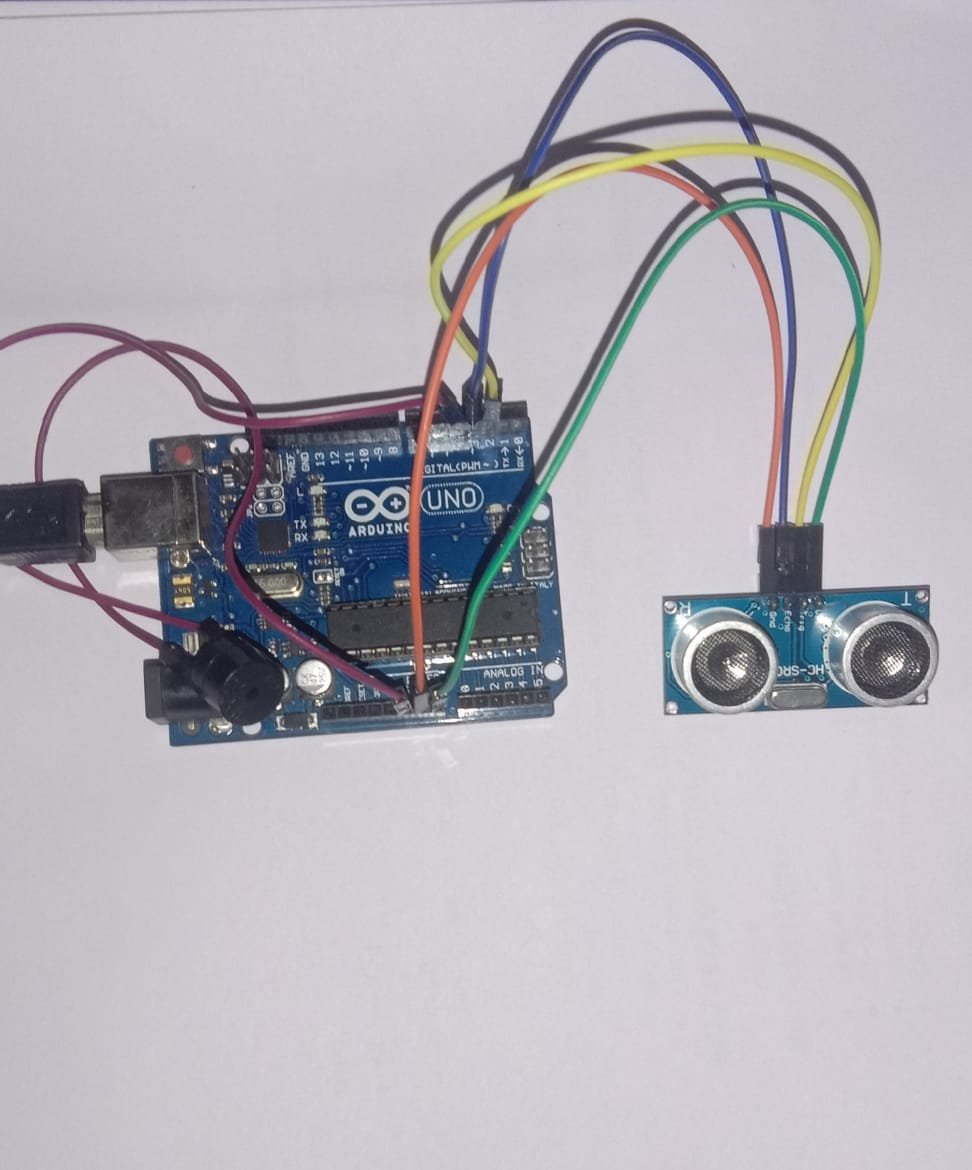
This tutorial will demonstrate the implementation of a simple security system using Arduino Uno and Ultrasonic sensor.
STEP 1:
First of all we will discuss the components needed for impementing this project:
- Arduino Uno Board
- Ultrasonic Sensor
- Buzzer
- Wires
- Breadboad (if required)
Step 2:
If you are ready with above components then try to make connections with the help of following pin diagram that is
- VCC of Ultrasonic sensor = +5V of arduino.
- GND of Ultrasonic sensor = GND of arduino.
- TRIGGER pin of Ultrasonic sensor = Digital pin 2 of arduino,
- ECHO pin of Ultrasonic sensor = Digital pin 3 of arduino.
- VCC of buzzer = Digital pin 4 of arduino.
- GND of buzzer = GND of arduino.
.PNG)
Step 3:
Now upload the following code to the Arduino Board
//use SoftwareSerial library file for displaying result
//on serial monitor
#include<SoftwareSerial.h>

//digital pin 2 for trigger
const int triggerpin=2;
//digital pin 3 for echo
const int echopin=3;
//digital pin 4 for buzzerpin
const int buzzerpin=4;

//use two variables "dur" for duration
long dur;
//and "dist" for calculating distance
long dist;

void setup(){
  //define the pins under setup block
   pinMode(triggerpin,OUTPUT);
   pinMode(echopin,INPUT);
   pinMode(buzzerpin,OUTPUT);
   //define baudrate 9600 for communication
   Serial.begin(9600);
}

void loop(){
  //first make sure that trigger pin is low
  digitalWrite(triggerpin,LOW);
  delayMicroseconds(2);
  //now make trigger pin high for 10 microseconds
  digitalWrite(triggerpin,HIGH);
  delayMicroseconds(10);
  digitalWrite(triggerpin,LOW);
  //calculate duration of sound pulse by making echo pin high
  dur=pulseIn(echopin,HIGH);
  delayMicroseconds(30);
  dist=(dur*0.034)/2;//since speed of sound in air is 343.2 m/s.
  //condition for object detection
  if(dist<10){
    digitalWrite(buzzerpin,HIGH);
    Serial.println("Object detected ");
  }else{
    digitalWrite(buzzerpin,LOW);
    Serial.println("object Not detected ");
  }
  delay(500);
}
Step 4:
It will produce the following output on serial monitor.You can hear buzzing of detection without serial monitor also :

If you succesfully reached step 4 then your security system is ready to use.......!!!!